Neon vs AWS RDS Pricing: When Serverless Stops Winning
Is Neon cheaper than RDS? Only while the database idles. Once it runs full time the flat instance rate wins, and the instance you would buy sets that line.
Amazon RDS asks you to size an instance, a disk, and a standby before the first query runs. Neon asks for none of that and bills what the database actually did. One bill is agreed in advance. The other is discovered at the end of the month.
Choose Neon if your databases are idle most of the month, or you spin them up and throw them away faster than you could size an instance. Choose Amazon RDS if one database runs all month and you want a standby ready to take over, disk performance you control, and a number that does not move. Choose neither if you need one small always-on Postgres in Manila at a price you can budget a year ahead. Neither company operates there. Nearbase does, though not in Europe or the Americas outside Virginia.
Where Neon stops being cheaper depends on the RDS instance you would otherwise have bought. Against a small burstable db.t4g.medium in Singapore, Neon matches it at about 700 CU-hours a month on the published rates we pulled from both vendors. Against a db.m7g.large, the class a round-the-clock workload actually calls for, that line moves out to about 1,610.
Neon vs Amazon RDS at a glance
| Dimension | Neon | Amazon RDS for PostgreSQL |
|---|---|---|
| Architecture | Serverless Postgres: storage sits apart from a compute layer that scales itself, pauses when idle, and branches. No instance class to pick | Managed Postgres on a provisioned instance you size before you start |
| Billing unit | The CU-hour: $0.106 on Launch, $0.222 on Scale, plus $0.35 per GB-month of storage | The instance-hour at a fixed rate, plus provisioned storage, IOPS, and data transfer |
| When nothing is querying | Compute suspends after five minutes. Neon’s own restart example is 350ms, and independent reports run nearer a second | Nothing pauses, and a stopped instance still bills its storage and backups |
| High availability | Redundancy sits in multi-AZ storage, so there is no standby instance to size or buy. Read replicas are separate computes | Multi-AZ with one standby at roughly double the instance rate, or two readable standbys at roughly triple |
| Branching | Copy-on-write branches in seconds, 10 included on Launch and 25 on Scale | A snapshot restored to a new instance, taking longer as the database grows |
| Versions and extensions | pgvector, PostGIS, and the Apache-2 subset of TimescaleDB. You pick the major version when you create the project. There is no in-place major upgrade, so moving up means a new project and a migration | PostgreSQL 14 through 18 in standard support, plus a wider extension set. Older versions need Extended Support, billed per vCPU-hour on top of the instance |
| Asia and the Middle East | Singapore, and nothing else in Asia | 14 Asia Pacific regions, plus the UAE, Bahrain, and Israel |
| Uptime SLA | On the Scale plan only | Published, at 99.95% for Multi-AZ and 99.5% for Single-AZ, with micro instance classes excluded |
| Where it falls short | The bill rises with traffic instead of holding at the number you provisioned, and Singapore is the whole Asian footprint | Reviewers name cost as the top complaint, and unused capacity is money gone |
What is Neon?
Neon is serverless Postgres. It runs ordinary Postgres, but keeps the data somewhere separate from the machine doing the querying. That machine switches off when nobody is asking it anything, and the next query turns it back on.
You rent that machine by the hour in Compute Units, each roughly 1 vCPU and 4 GB of RAM. Storage arrives as its own line, charged per GB-month. There is no instance to pick, which is the first thing an RDS user notices.
Databricks agreed to acquire Neon in 2025. Neon carries on as its own standalone product at neon.com, still sold on the Launch and Scale plans. The Postgres underneath is now branded Lakebase Postgres.
What is Amazon RDS for PostgreSQL?
Amazon RDS for PostgreSQL is AWS’s own managed Postgres. You choose a database instance by class and size, and you pay for it by the hour whether or not a single query arrives.
AWS takes over patching, automated backups, and failover. The sizing calls stay with you. The instance lives in your VPC and connects to IAM, KMS, and CloudWatch, which is usually the real reason a team picks it.
What Neon and RDS charge for, up front or as you go
RDS turns four questions into four charges, all of them settled before the database exists. Neon leaves the same four questions to runtime and bills the answers afterwards.
| Decision | Neon | Amazon RDS for PostgreSQL |
|---|---|---|
| Capacity | An autoscaling range in CUs, a floor and a ceiling you set | An instance class at one hourly rate, 4am or peak, plus CPU credits on the burstable classes |
| Redundancy | Multi-AZ storage by default, nothing to size or purchase | One standby at roughly double the instance rate, or two readable standbys at roughly triple |
| Storage and IO | No volume to size, billed on the bytes actually held | 20 GiB to 64 TiB provisioned, or Provisioned IOPS to 256,000, billed as provisioned |
| Recovery window | Restore history and snapshots, each billed per GB-month | Automated backups and manual snapshots kept against the provisioned volume |
| Where it falls short | Nobody can quote you next month’s number | You paid for the peak you guessed at, every hour of the month |
RDS wants an instance class first. A db.t4g.medium is 2 vCPU and 4 GiB, and its hourly rate is the same at 4am as during your busiest hour. Neon takes a range instead: set a floor and a ceiling in CUs, and the database moves between them as traffic moves.
Redundancy. On RDS, high availability is hardware you buy. One standby in a second Availability Zone fails over automatically, and roughly doubles what the instance costs. Two readable standbys spread across three zones serve reads as well, and cost nearer triple. Neon puts its high availability in the storage layer instead. The storage is already multi-AZ, and there is no standby to buy. Read scaling is still on offer, as read-only computes billed by the CU-hour. You do not get RDS Multi-AZ’s failover standby, though. On RDS you decide whether to buy one and what class it is, and RDS picks the second zone for you.
Neon has no volume to size, and bills the storage you are actually holding. RDS wants the volume before the data: 20 GiB to 64 TiB of General Purpose SSD, or Provisioned IOPS from 1,000 to 256,000 when the workload is IO-bound. The invoice follows what you provisioned, not what you filled, and it keeps arriving while the instance is stopped.
Recovery window. How far back can you go, and can you look before you commit? RDS holds automated backups and manual snapshots against your provisioned volume. Restoring either one builds a fresh instance, so recovery is a provisioning job rather than a query. Neon bills recovery as history instead, charging for the write-ahead log inside your restore window. The same window lets you read a moment in the past or branch a database from it without waiting for hardware.
RDS sells you an instance rate that holds still: a frantic Tuesday and a dead Sunday buy the same hours. The burstable classes carry one exception, and it bills separately. You also get to decide whether a standby exists and how big it is. Neon sells you the opposite. An unused database is free, and nobody can tell you the total until the month ends.
When does Neon stop being cheaper than Amazon RDS?
There is no single crossover number, because the answer belongs to whichever RDS instance you would otherwise have bought. Against a small burstable db.t4g.medium in Singapore, Neon’s compute bill matches it at about 700 CU-hours a month. Against a db.m7g.large in the same region, the line sits nearer 1,610. Count either one in CU-hours, not in hours awake, because autoscaling makes those two numbers stop agreeing.
A Neon CU is roughly 1 vCPU and 4 GB, which lines up closest with a db.t4g.medium at 2 vCPU and 4 GiB. We derived the break-even points below from each region’s on-demand rate against Neon’s Launch rate of $0.106 per CU-hour, over a 730-hour month. Storage is left out of both sides, because both bill it separately. Run the same math on your own numbers and it still holds.
We started this comparison on the t4g rows alone and had to add the m7g one. The t4g class is burstable, built for a database that idles between spikes rather than one holding a full compute unit all month. A workload that busy would be bought on a non-burstable class instead, so an always-on database belongs on the db.m7g.large row.
| Workload shape | RDS configuration | Singapore per month | Neon matches it at | US East per month | Neon matches it at |
|---|---|---|---|---|---|
| Part-time internal tool | db.t4g.micro, Single-AZ | $18.25 | About 170 CU-hours | $11.68 | About 110 CU-hours |
| Small always-on app | db.t4g.medium, Single-AZ | $74.46 | About 700 CU-hours | $47.45 | About 450 CU-hours |
| Small always-on app needing failover | db.t4g.medium, Multi-AZ with one standby | $148.19 | About 1,400 CU-hours | $94.17 | About 890 CU-hours |
| Round-the-clock production | db.m7g.large, Single-AZ | $170.82 | About 1,610 CU-hours | $122.64 | About 1,160 CU-hours |
That floor number in the table matters more than any of the ceilings above it. Even with suspend switched off, Neon holds 0.25 CU around the clock, about $20 a month on Launch. That works out to 187.5 CU-hours over a 750-hour month, twenty hours more than the 730-hour month behind the RDS totals. A small always-on Neon database lands above a db.t4g.micro ($18.25) and below a db.t4g.medium ($74.46).
Each row is a ceiling on how much Neon compute you can burn before the instance you would otherwise have bought becomes the cheaper answer. The micro row sets that ceiling at about 170 CU-hours in Singapore, which is a genuinely part-time database. The Multi-AZ pair sets it far higher. A standby doubles the RDS line, which hands Neon another 700 CU-hours of room to work with.
Picking your row means guessing an average CU size, and you cannot get it exactly right before the workload exists. Bound it instead. A database answering a few requests a minute and then going quiet stays near the floor, while one carrying queued jobs or overnight reads holds a whole CU or more.
RDS absorbs growth in steps. Traffic that doubles costs nothing extra until the instance runs out of room, and then the bill jumps one class and stops. Neon has no step, so the same doubling arrives in full. A database averaging a whole CU burns 730 CU-hours a month, roughly $77. That is already past the Singapore db.t4g.medium line.
Once it’s live, you’re not guessing anymore, just doing the math. Take the CU-hours off your own Neon invoice, divide by the month’s hours, then compare that average to the row for the shape you would otherwise have bought.
The asymmetry is the whole trade. Neon’s bill grows as the product grows. The RDS bill was decided the day somebody picked an instance class.
Neon: compute you rent by the hour
Neon answers the four decisions at runtime rather than at purchase:
- Capacity becomes an autoscaling range instead of an instance class
- Redundancy becomes multi-AZ storage instead of a standby you buy
- Storage and IO become usage you are billed for instead of a provisioned volume
- Recovery window becomes history billed by usage instead of backups held on that volume
Who it’s for
Neon is for teams running a lot of databases that sit asleep most of the time. A preview database per pull request is the clearest case. If your fleet is one production database that runs all month, the serverless discount never arrives, and you are renting compute by the hour at retail.
What it does well
Branching is where Neon leaves a provisioned instance behind. Ask for a branch and a few seconds later you have a throwaway database with production’s rows already in it. You can query it while you are still looking at the console.
On RDS you restore a snapshot instead, and you wait for a whole new instance to come up before you can run a single query against the copy. Branches are not unlimited, though. Launch includes 10 per project, Scale includes 25, and extras run $0.002 per branch-hour.
Pausing is the other half of the contrast, and it is the half RDS never has to answer for. An RDS instance is already awake, because you have been paying for it to be. Neon suspends after five minutes, so the first query of a quiet morning pays for a restart. Neon’s pricing page puts that restart at 350ms in its own intermittent-workload example. A developer profiling Neon in AWS London reported 600 to 980ms of extra latency on Postgres 15 and 16. Budget for the wider figure and build the retry path around it.
Where it falls short
On Neon, growth and the bill move together. A flat instance rate never does. OpenSecret ran four databases with no replicas. Its migration post said usage pricing “punished our success, the more users chatted, the more we paid,” and put the cost at $250 a month. Its co-founder added a second number in the Hacker News thread about that post: $260 for 1,947 compute hours in one month. There was no clear account of where the hours went.
A Neon project’s major version is fixed the day you create it. There is no in-place major upgrade, so moving up a major means a new project and a migration rather than a maintenance window. RDS gives you an upgrade path instead, and bills Extended Support if you decline to take it.
Region coverage is the harder limit for anyone building in Asia. Neon’s region docs list eight AWS regions, and Singapore is the only Asian one on that list. The region is fixed at project creation as well, so a team that outgrows Singapore’s reach is facing a migration rather than a setting.
Switching suspend off to dodge cold starts costs you the thing you came for. A Neon compute that never sleeps is an always-on compute unit rented by the hour, which is what an RDS instance already is. The floor is 0.25 CU, and it only goes up from there.
Pricing
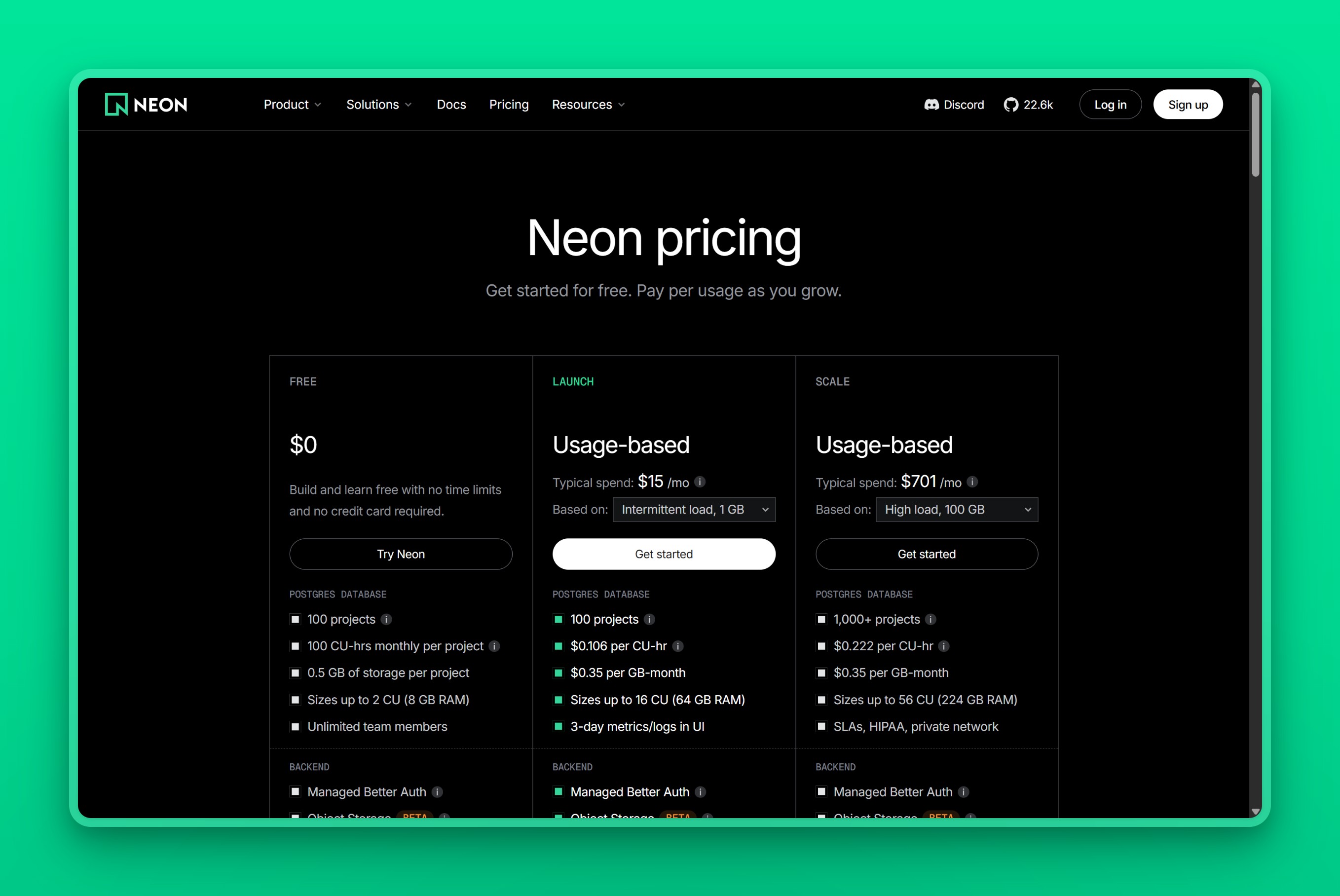
| Plan | Compute | Storage | Idle behaviour |
|---|---|---|---|
| Free | 100 CU-hours per project, sizes to 2 CU | 0.5 GB per project | Suspends after five minutes, not configurable |
| Launch | $0.106 per CU-hour, sizes to 16 CU | $0.35 per GB-month | Suspends after five minutes, can be disabled |
| Scale | $0.222 per CU-hour, sizes to 56 CU | $0.35 per GB-month | Configurable, including always-on |
The crossover figures count compute alone. Three smaller lines sit beside it, each billed on what the database actually did:
- Instant restore history at $0.20 per GB-month, sized by how much data changed inside your window
- Snapshots and scheduled backups at $0.09 per GB-month
- Egress at $0.10 per GB once a paid project passes its 500 GB allowance
Backups and Provisioned IOPS are separate lines on the RDS invoice, and redundancy is a second instance you buy outright. That is why the crossover turns on average CU size rather than on any one charge.
 Neon pricing page.
Pick Neon when the database spends most of the month asleep and your team branches it constantly. Skip it when the database runs all month, the case where an RDS instance already prices better.
Amazon RDS for PostgreSQL: capacity you buy in advance
RDS locks capacity in as commitments made before the first query:
- Capacity is an instance class
- Redundancy is Multi-AZ nodes you provision
- Storage and IO are a volume you size in advance
- Recovery window is backups held against that volume
Who it’s for
RDS fits teams already inside AWS who want the database to be the dull part of the stack. The application runs on EC2 or ECS in the same VPC, IAM already decides who can touch what, and the compliance story is written in AWS vocabulary.
Steady production is the specific fit. Once a database is awake all month, a provisioned instance stops being the expensive answer.
What it does well
High availability on RDS is something you configure rather than something you hope the architecture covers. Multi-AZ with one standby fails over automatically during both planned and unplanned outages. AWS’s uptime SLA rates that shape at 99.95% and a single instance at 99.5%. Micro instance classes are excluded from both figures. Multi-AZ with two readable standbys puts identical instances across three Availability Zones, so the redundancy serves reads too. Every one of those nodes is capacity you provision in advance, the same bargain you already struck when you picked the instance class.
Version coverage is current. The RDS release calendar has PostgreSQL 18 generally available, with standard support running 14 through 18. Versions 11, 12, and 13 have each passed their end of standard support date and are reachable only through paid Extended Support.
Reviewers rate the service 4.5 out of 5 on G2, most often praising ease of use and scalability.
Where it falls short
On that same G2 page, cost is the complaint reviewers raise most, ahead of limited control. That is G2’s own tally, not a hand count, so treat it as a rough shape. Either way, developers say the bill climbs faster than usage does. Control is the other recurring gripe, and that one is concrete, since RDS gives you no OS access and no superuser.
Four lines move independently, which is what makes the total hard to hold still:
- Instance-hours, billed whether or not anything queries the database
- Storage, billed on the volume you provisioned rather than the bytes you filled
- Provisioned IOPS, when the workload calls for them
- Data transfer
Multi-AZ with one standby roughly doubles the instance line on top of all four, and two readable standbys cost nearer triple. We checked both multipliers against AWS’s own regional price maps. A stopped instance keeps billing storage and backups.
The T4g/T3 Unlimited-mode surcharge is part of this same cost picture. T4g and T3 instances run in Unlimited mode. Sustained CPU above the baseline costs $0.075 per vCPU-hour, and no Reserved Instance covers that charge. It is also the ceiling on the burstable shapes in the crossover arithmetic. A database holding a full compute unit all month pays this on top of its published instance rate, which is why that workload belongs on a non-burstable class.
Falling behind on versions carries its own charge. Extended Support is priced per vCPU-hour, and the rate varies by region and by how long the version has been out of support. AWS’s worked example on that same pricing page puts a PostgreSQL 11 db.r5.large in US East (N. Virginia) at $0.200 an hour within the first year of Extended Support. That is 2 vCPUs at $0.100 per vCPU-hour, on top of everything else.
For a small or bursty workload the model simply does not bend. There is no scale-to-zero, no branching, and no way to recover the cost of capacity you never used.
Pricing
| Configuration | Singapore, on demand | US East, on demand | What the rate covers |
|---|---|---|---|
| db.t4g.micro, 2 vCPU / 1 GiB, Single-AZ | $0.025 per hour | $0.016 per hour | Instance-hours only |
| db.t4g.medium, 2 vCPU / 4 GiB, Single-AZ | $0.102 per hour, about $74 a month | $0.065 per hour, about $47 a month | Instance-hours only |
| db.m7g.large, 2 vCPU / 8 GiB, Single-AZ | $0.234 per hour, about $171 a month | $0.168 per hour | Instance-hours only |
| Multi-AZ with one standby | Roughly double the Single-AZ rate | Roughly double the Single-AZ rate | The standby instance |
| General Purpose SSD storage | $0.138 per GB-month | $0.115 per GB-month | The provisioned volume, billed while stopped |
Those are AWS’s own per-region rates. Reserved Instances cut the instance line in exchange for a one or three year term, while Database Savings Plans do it against a one-year usage commitment.
 Amazon RDS for PostgreSQL pricing page.
Use cases
- One production database with steady traffic, sized once and left alone
- Workloads needing a readable standby, read replicas, or IOPS you control
- Applications wired into AWS networking, IAM, KMS, or zero-ETL pipelines into Redshift
- A compliance review that expects the database inside your own VPC
Pick RDS when you are already standardised on AWS and will pay for integration depth and control. Skip it when you want a low flat price or superuser access.
Free tiers: what AWS changed, and what Neon actually gives you
The free tier is the one place on either side where you are not paying for a decision made in advance.
AWS’s free tier page now describes credits rather than the 750-hours-for-12-months offer still quoted across the web. A new account gets $100 in credits immediately and can earn up to $100 more, so up to $200 across six months. The account then closes on its own six months after opening, or when the credits run out.
AWS’s RDS pricing page still describes the older offer, which covers a new account’s first year. That one is 750 hours a month on selected Single-AZ instances, 20 GB of storage, and 20 GB of backup storage. The two AWS pages describe different offers for a brand new account, so confirm the terms against your own at signup.
Neon’s free plan is not a small paid plan, it is a hard-limit plan. Each project gets 100 CU-hours and 0.5 GB, suspend is always on, and the database stops once a limit is hit. That is fine for prototypes and unusable for production.
Regions and residency: where Neon and Amazon RDS actually run
Region coverage is the one dimension where the two are not close, and RDS wins outright. By AWS’s own region list, RDS for PostgreSQL runs in 14 Asia Pacific regions. Those include Singapore, Tokyo, Osaka, Seoul, Mumbai, Hyderabad, Jakarta, Kuala Lumpur, Bangkok, Taipei, and Hong Kong, plus three Middle East regions: the UAE, Bahrain, and Israel.
Neon reaches Asia through Singapore and nothing else. It has also stopped taking new projects on Azure, so its eight AWS regions are the whole map.
Because RDS gets to Jakarta and the UAE directly, the trade there is not reach. It is price and complexity. A Jakarta instance is a full RDS deployment carrying the same Multi-AZ, IAM, and version decisions as anywhere else, priced by instance class rather than a flat regional rate.
Manila is the sharper case, because neither company operates there. From Manila every query has to reach Singapore and come back. Load a page that runs ten of them and the reader waits ten times over, and neither branching nor provisioned IOPS shortens the distance.
Residency turns the same question binary. Take a Philippine fintech that has to hold records inside the country because either a regulator or a customer contract says so. A Singapore region does not satisfy that, however close Singapore looks on a map. Neither Neon nor RDS has anywhere to put the data, so the shortlist becomes a different one.
Moving a database between Neon and Amazon RDS
Moving data either way is ordinary Postgres work. Both run standard PostgreSQL and both speak logical replication, so neither holds your data in a shape the other cannot read. A pg_dump and pg_restore pass covers a small database and a maintenance window. Logical replication covers a larger one where downtime has to stay inside a few minutes.
The data is the easy half. What actually changes is who makes the four sizing decisions.
- Neon to RDS. Branch-per-preview automation has to be rebuilt on snapshots and restores, which take longer as the data grows. You also take back the sizing decisions autoscaling had been making for you.
- RDS to Neon. Multi-AZ standbys and RDS Proxy leave the architecture, replaced by Neon’s multi-AZ storage and its own pooler. You choose a cold-start policy before real traffic chooses one for you.
Budget for connection handling in both directions. Serverless functions hitting a suspended database behave nothing like a pooled connection to an instance that is already warm. That is usually the surprise, not the data transfer.
How to choose between Neon and Amazon RDS
Three checks settle most cases.
- Estimate the average CU size the database will hold, then read it against the crossover row for the instance you would otherwise buy. Near the 0.25 CU floor Neon wins outright. A full CU held around the clock has already passed the small-instance line.
- Ask whether branching is central to how your team ships. If preview and CI databases are part of the workflow rather than a nice-to-have, that alone can outweigh a modest cost gap in either direction.
- Ask who has to own redundancy and disk performance. If you need a dedicated failover standby you buy and size, or IOPS you set rather than inherit, only RDS sells those as things you configure. If you would rather never size a volume again, Neon takes both decisions off your desk.
Region overrides all three when it applies to you. Amazon RDS reaches Jakarta, Kuala Lumpur, Bangkok, Mumbai, and the UAE, and Neon reaches none of them. If your users sit in a city AWS serves and Neon does not, RDS wins whatever the CU arithmetic says. Some databases fit neither answer: small, always on, and needing a city that neither company operates in. That combination is common across Southeast Asia and the Middle East.
Nearbase: one flat price, and a region in Manila
RDS moves four billing lines independently: instance-hours, provisioned storage, IOPS, and data transfer. Nearbase collapses that to two. Pick an instance configuration, and capacity, redundancy, and recovery all arrive with it at one price that does not change by region. Storage is the second line, billed per 10 GB.
The entry instance is General Purpose ARM with 1 vCPU and 2 GB at $6 a month. Storage is a separate line at $3.6 per 10 GB per month with a 20 GB minimum, so the smallest configuration works out to about $13 a month all-in. The largest Dedicated instance, 32 vCPU and 256 GB, is $2,682 a month.
 Nearbase homepage.
Nearbase runs in ten regions: Jakarta, Manila, Kuala Lumpur, Hong Kong, Singapore, Tokyo, Seoul, Dubai, and Bangkok, plus Virginia in the United States. Manila is the one that matters most here, because neither Neon nor AWS operates there. Elsewhere in Asia the trade is price and complexity rather than reach, since RDS does run in Jakarta, Bangkok, Kuala Lumpur, and the UAE.
Nearbase commits to a 99.99% uptime SLA covering automated backups, patching, and automatic failover. It also says data is encrypted at rest and in transit. None of that is a line you buy. The published catalog lists no separate standby, and the pricing page covers only the instance and its storage. RDS sells the same redundancy as a second instance you buy and size, and in its two-readable-standby shape you can read from it too. Neon puts its uptime SLA behind the Scale plan.
Nearbase says CPU, memory, and storage each scale one click at a time, independently and without downtime. Capacity and storage go back to being decisions you revisit rather than ones you commit to.
Skip Nearbase if your users sit in Europe or in the Americas outside Virginia. Skip it too if branch-per-pull-request is how your team ships, or if the database has to live inside an AWS VPC alongside everything else.
If none of Neon, RDS, or Nearbase fits the city you need or the way your team ships, the Neon alternatives roundup prices ten more. It covers RDS and Nearbase as well, alongside Supabase, Aiven, and Crunchy Bridge. If RDS is the side you are leaving, the AWS RDS alternatives roundup starts from there instead.
Start an instance: choose the city, pay one flat instance price plus storage.
Frequently asked questions
At what point does Neon cost more than RDS?
It depends on which RDS instance you would otherwise have bought. Against a db.t4g.medium in Singapore, Neon’s compute passes it at about 700 CU-hours a month, and at about 450 in US East. A database genuinely holding a full compute unit around the clock belongs on a non-burstable db.m7g.large instead. Against that shape Neon stays cheaper to about 1,610 CU-hours in Singapore and 1,160 in US East.
Does turning off scale-to-zero make Neon expensive?
Not on its own. With suspend disabled, Neon still holds a 0.25 CU floor, about $20 a month on Launch. That sits above a Singapore db.t4g.micro at $18.25, and well under a db.t4g.medium at $74.46.
Is Neon just Postgres?
Yes, underneath the hourly billing. A Neon database runs community PostgreSQL with a storage layer around it that separates data from compute, so the compute can pause, autoscale, and branch. Anything written for standard PostgreSQL, including a database on Amazon RDS, runs on Neon without changing your SQL. It is extensions and upgrades that differ, not SQL. Neon ships pgvector, PostGIS, and the Apache-2 subset of TimescaleDB, so check your own list before assuming a drop-in move off RDS.
Why use Amazon RDS instead of running Postgres on EC2?
RDS takes over the work that makes a database a full-time job: provisioning, patching, automated backups with point-in-time recovery, and automatic failover to a standby. On EC2 all of that is yours to build and keep working. The trade is control. RDS gives you no OS access and no superuser, so an extension or a kernel setting AWS does not support is simply unavailable.
Why would I use Neon at all if RDS is cheaper at scale?
Branching and scale-to-zero, not the hourly rate. Branching gives every pull request its own full-size database in seconds, which snapshots and restores cannot match. Launch includes 10 of those branches per project and Scale includes 25. Scale-to-zero means an idle database costs nothing, which is the difference between running twenty preview environments and running two. Neither is worth much for a single production database that never sleeps.
Does Neon have an uptime SLA?
Neon offers an uptime SLA only on its Scale plan; the Free and Launch plans carry none. High availability itself is not plan-gated, because Neon’s storage is multi-AZ on every plan. Amazon RDS puts its own commitment at 99.95% once you run Multi-AZ, dropping to 99.5% on a single instance, with the micro classes carved out of both numbers. If your own contracts carry uptime commitments, budget for Scale from day one.
Does Amazon RDS have a free tier?
Yes, though AWS’s own two pages disagree on the terms. The AWS free tier page describes credits, up to $200 across about six months for a new account. The RDS pricing page still describes 750 instance-hours a month plus 20 GB of storage for a new account’s first 12 months. Check which one your account gets at signup.
Which regions does Neon run in?
Neon lists eight AWS regions: N. Virginia, Ohio, Oregon, Frankfurt, London, Singapore, Sydney, and São Paulo. Singapore is the only Asian one on that list. You pick the region when you create the project and it stays there, so the choice is effectively permanent and changing it later is a migration. If your users sit outside Singapore’s reach, pick Amazon RDS for a city AWS serves, or a regional provider for one it does not.
Is Neon a good AWS alternative for Indian businesses?
Only for workloads that genuinely idle, because Neon has no Indian region. Traffic from Mumbai or Bengaluru reaches Neon’s nearest data centre in Singapore, adding a round trip to every query. Amazon RDS runs in both Mumbai and Hyderabad. For a steady production database serving users in India, RDS or a regional provider beats Neon on latency whatever the billing model says.
What should I run for users in Southeast Asia?
Put the database in the country your users are in first, then choose the billing model. Amazon RDS reaches Jakarta, Kuala Lumpur, Bangkok, Singapore, and Hong Kong, while Neon reaches only Singapore. Nearbase runs in nine Asia and Middle East cities plus Virginia, ten regions in total, including Manila, at the same flat price everywhere. That suits an always-on database that needs neither branching nor a standby you configure yourself.
How long does restoring an RDS snapshot take?
Longer as the database grows, and AWS publishes no fixed figure because the wait tracks data size and instance class. What you are waiting for is a whole new instance to finish provisioning, since the restored data becomes queryable only once that instance is up. A Neon branch is queryable the moment you create it, because it points at existing storage rather than copying it. If recovery speed is part of what you are buying, that is the gap to weigh.
Last updated 2026-08-04