AWS RDS Pricing Explained: Every Charge on Your Bill
AWS RDS pricing spans seven billing dimensions on your PostgreSQL bill. This teardown explains each one with worked examples at three production scales.
A production PostgreSQL database on AWS RDS (db.m6g.large, 100 GB gp3, Single-AZ) costs roughly $128 a month. Step up to a db.m6g.xlarge, add Multi-AZ failover, 500 GB of storage, and RDS Proxy, and the bill climbs to $642. Seven billing dimensions cover the range: five usage-based charges, one option (Multi-AZ) that doubles the base cost, and one commitment (Reserved Instances) that cuts it. The three that catch teams off guard are io1 storage instead of gp3, Multi-AZ doubling the compute charge, and backup storage running past the free allocation. For a predictable flat bill, Nearbase runs managed PostgreSQL at $6 a month for the instance plus $3.6 per 10 GB of storage, same price in every region, no IOPS or egress fees.
Table of contents
- What is AWS RDS pricing?
- AWS RDS PostgreSQL: seven billing dimensions at a glance
- Key takeaways
- How RDS instance pricing works
- How RDS storage pricing works
- What AWS RDS Multi-AZ actually costs
- AWS RDS backup and snapshot pricing beyond the free tier
- When AWS RDS data transfer becomes a line item
- RDS reserved instances and how much they actually save
- Hidden costs most RDS guides skip
- What your AWS RDS bill actually looks like: 3 worked examples
- How to cut your RDS bill: a 7-point checklist
- Which RDS setup should you choose?
- When AWS RDS is actually the right call
- Bottom line on AWS RDS pricing
- AWS RDS pricing FAQ
What is AWS RDS pricing?
AWS RDS (Relational Database Service) is Amazon’s managed PostgreSQL, MySQL, MariaDB, Oracle, and SQL Server hosting. You provision an instance and pick a storage volume; AWS handles patching, backups, and failover. The pricing model is pay-as-you-go with per-second billing and a ten-minute minimum per start.
RDS pricing is hard to predict because it stacks so many line items: five charges that bill by usage, one option (Multi-AZ) that doubles the base cost, one commitment (Reserved Instances) that cuts it, and four common add-ons.
AWS RDS PostgreSQL: seven billing dimensions at a glance
RDS pricing spans seven billing dimensions plus several add-ons. Five are usage-based charges that grow with your workload; Multi-AZ doubles the base compute and storage cost; Reserved Instances reduce it. Not every dimension applies to every deployment. The worked examples below cover PostgreSQL DB instances with one standby (Multi-AZ DB Instance), not Multi-AZ DB Clusters.
| Dimension | What it is | Typical range | Surprise factor |
|---|---|---|---|
| Instance hours | On-demand compute, billed per second (10-minute minimum per start or instance-class change) | $12-$700+/month | Low, visible upfront |
| gp3 storage | SSD block storage for the database volume | $2-$58+/month | Low |
| Provisioned IOPS | Extra IOPS above the gp3 free baseline, or an io1/io2 volume | $0-$300+/month | High, io1 may be selected by default |
| Backup storage | Automated and manual snapshot storage beyond the free regional allocation | $0-$100+/month | Medium |
| Data transfer | Internet egress, cross-AZ application traffic, cross-region | $0-$50+/month | Medium |
| Multi-AZ | Synchronous standby doubles instance hours and storage | 2x base cost | High, one checkbox doubles the bill |
| Reserved instances | 1-year or 3-year billing commitment discounting the on-demand rate | Varies by term/payment option | Positive, reduces not increases |
Key takeaways
| Takeaway | Why it matters |
|---|---|
| Seven billing dimensions can appear on an RDS invoice | A $14/month dev setup reaches $642/month at production scale once you step up the instance class, add Multi-AZ, backup overage, and RDS Proxy |
| io1 storage costs more than six times what gp3 costs for the same database size | The Easy Create wizard has historically defaulted some configurations to io1; at 500 GiB gp3 includes 12,000 IOPS free |
| Multi-AZ doubles both compute and storage | One checkbox takes a $128/month bill to roughly $260 before adding backup overage |
| Backup overage grows with your data change rate and retention period | Usage beyond the free 100% allocation bills at $0.095/GB-month; the AWS Pricing Calculator can estimate it once you provide your changed-block volume |
| Reserved instance savings vary by term and payment option | For a db.m6g.xlarge: ~36% at 1-year no-upfront (~$149/month), ~60% at 3-year all-upfront (~$93/month amortized) |
| Extended Support charges $0.200/vCPU-hour in year three | A 2-vCPU Single-AZ instance on an out-of-support engine adds $292/month in year three; upgrade to avoid it |
| Flat-price alternatives exist | Nearbase charges $6/month instance + $3.6 per 10 GB storage, same price in every region, no IOPS or egress fees |
How RDS instance pricing works
The instance rate is the one charge most teams know before they deploy, and the one that matters least in isolation. The instance rate alone excludes storage, I/O, and data transfer.
RDS bills compute by the second, with a ten-minute minimum per instance creation, start, or instance-class change. Per-second billing is genuinely useful for dev databases you spin up and tear down during the week. For an always-on production database, it is a detail that does not change the monthly total meaningfully.
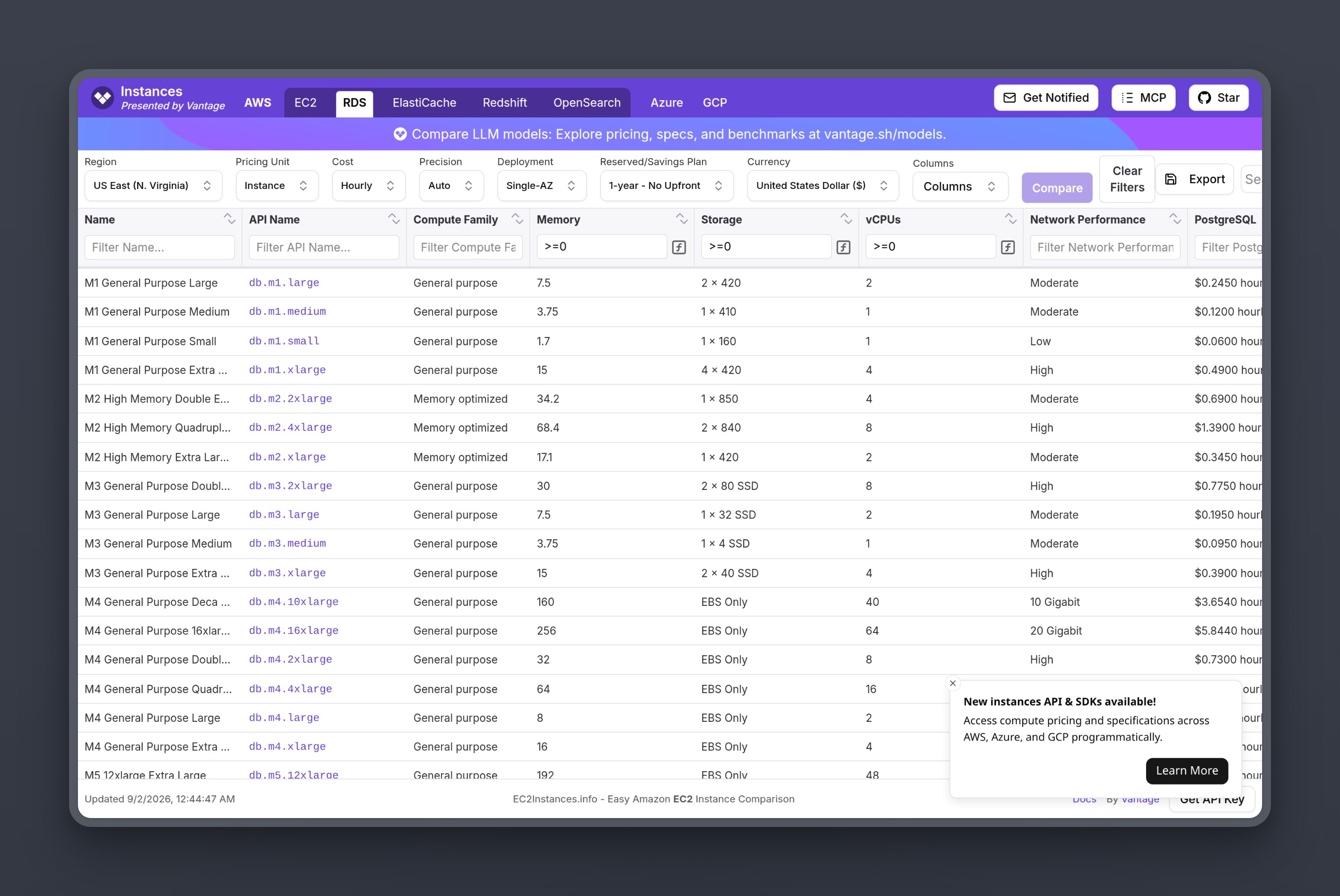
The instance families worth knowing for PostgreSQL are T4g (burstable, suited for variable workloads), M6g (general purpose, the right default for most SaaS applications), and R6g (memory-optimized, suited for schemas that benefit from a large shared buffer). R-series costs more per core because it carries more memory per vCPU. A general-purpose SaaS application usually stays on M-series.
| Instance | vCPU | RAM | On-demand rate (us-east-1, Single-AZ) | Approx monthly |
|---|---|---|---|---|
| db.t4g.micro | 2 | 1 GB | $0.016/hr | ~$12 |
| db.m6g.large | 2 | 8 GB | $0.159/hr | ~$116 |
| db.m6g.xlarge | 4 | 16 GB | $0.318/hr | ~$232 |
| db.r6g.large | 2 | 16 GB | $0.225/hr | ~$164 |
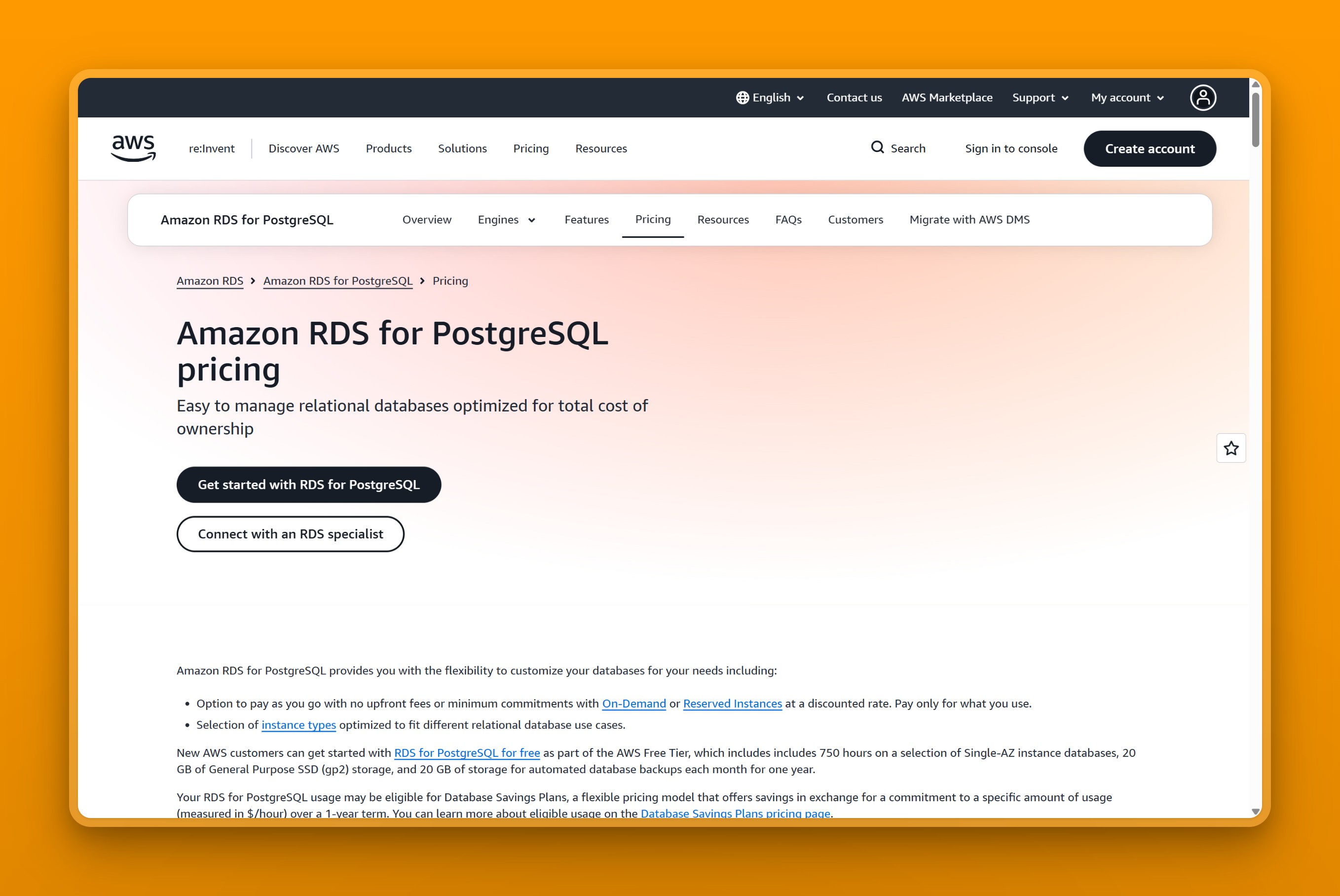
Free tier: AWS changed the RDS free-tier model on July 15, 2025. Accounts created before that date received 750 hours per month of a Single-AZ micro instance, 20 GB of storage, and 20 GB of backup storage for the first 12 months; all of those legacy windows have now elapsed. Accounts created on or after July 15, 2025 receive $100 in initial credits plus up to $100 in earned credits, with a free-plan period of up to six months; credits are valid for up to 12 months subject to plan and upgrade terms. Check the RDS free tier page for current credit amounts, eligible instance types, and expiry conditions that apply to your account.
When the T-series surprises you: T4g instances run on CPU credits. When CPU usage falls below the instance baseline, credits accumulate; sustained bursts draw down the balance. In Unlimited mode, the charge is $0.075 per vCPU-hour on the rolling 24-hour average CPU that exceeds the baseline, and it appears without warning unless you watch the CPU credit balance in CloudWatch. A database that regularly runs CPU-intensive migrations or report queries above the baseline will accrue this charge on top of the instance rate. If your database regularly exceeds its baseline (which varies by instance size), size up to an M-series instance. The per-hour rate is higher, but the credit-overage charge disappears and the total is predictable.
How RDS storage pricing works
Storage is the second line on the bill, and the one most likely to be wrong before the first invoice arrives.
gp3 is the right call for most PostgreSQL workloads. The gp3 baseline includes 3,000 IOPS and 125 MiB/s throughput at no additional charge for volumes under 400 GiB. For PostgreSQL volumes at 400 GiB and above, the included baseline rises to 12,000 IOPS and 500 MiB/s at no extra charge. You pay $0.115 per GB per month for the volume. For volumes at 400 GiB and above, additional IOPS (up to 64,000) and throughput (up to 4,000 MiB/s) can be provisioned at $0.02 per IOPS-month and $0.08 per MiB/s-month; the maximum provisioned throughput cannot exceed 25% of the provisioned IOPS, and extra IOPS cannot exceed 500 per GiB. See the RDS storage guide for the full eligibility bounds and ratio constraints.
| Storage type | Cost per GB/month | Baseline IOPS | Extra IOPS rate |
|---|---|---|---|
| gp3 (Single-AZ, us-east-1) | $0.115 | 3,000 (or 12,000 at 400 GiB and above) | $0.02/provisioned IOPS above baseline (volumes at 400 GiB and above only) |
| gp3 (Multi-AZ, one standby) | $0.230 | 3,000 (or 12,000 at 400 GiB and above) | $0.04/provisioned IOPS-month; $0.16/additional MiB/s-month above baseline |
| io1 | $0.125 | None included | $0.10/provisioned IOPS |
| io2 | $0.125 | None included | $0.10/provisioned IOPS (higher durability) |
Comparing the two storage types on a 500 GB volume illustrates the cost difference: gp3 costs $57.50 per month, while io1 with 3,000 provisioned IOPS costs $62.50 for the volume plus $300 for the IOPS, totaling $362.50, more than six times the gp3 cost for the same database size. Note that at 500 GiB, gp3 includes 12,000 IOPS at no extra charge, so the comparison is not equal-IOPS; io1 latency and durability characteristics differ.
When the storage type surprises you: the Easy Create wizard has historically selected Provisioned IOPS SSD (io1) as the default for some configurations. Check your storage type in the RDS console before assuming gp3.
If you created an RDS instance through Easy Create and the storage section of your bill is higher than expected, check whether your volume type is io1. The AWS console supports an in-place conversion to gp3. AWS documents the conversion as supported without a maintenance window for most workloads, but notes that intensive I/O usage and workload characteristics can affect performance during the migration; review the RDS storage modification guidance for your specific workload before converting.
What AWS RDS Multi-AZ actually costs
Multi-AZ is the charge that doubles the bill rather than merely adding to it.
Enabling Multi-AZ provisions a synchronous standby replica in a second availability zone. RDS charges instance hours for two instances and storage for two volumes. AWS does not charge for the cross-AZ data transfer generated by synchronous replication itself. You are renting two sets of hardware instead of one.
Enabling Multi-AZ on a db.m6g.xlarge takes the monthly compute cost from roughly $232 to roughly $464, before storage and other charges. Multi-AZ is the right trade for a production database where a failover event means real users see errors; on a staging environment where a brief downtime is acceptable, it doubles the bill without adding meaningful protection.
AWS does not charge for data transferred between availability zones for Multi-AZ replication. The cross-AZ transfer charge ($0.01 per GB each direction) applies to application traffic that crosses availability zones, not to the replication stream itself.
Single-AZ plus automated backups versus Multi-AZ: for a non-critical staging database, Single-AZ with daily automated backups achieves an acceptable recovery point with a manual restore path. Multi-AZ delivers automatic failover, typically completing in 60-120 seconds (potentially longer with large in-flight transactions or application reconnection), which Single-AZ plus restore from backup cannot match. The cost difference between the two is roughly 100% of your base instance and storage bill.
AWS RDS backup and snapshot pricing beyond the free tier
Backup storage starts free and stays free until your retention period or database size pushes past the free allocation.
RDS gives you automated backup storage equal to 100% of your total provisioned database storage at no charge, pooled across your account and region. AWS compares your daily provisioned storage against your daily backup usage; any excess is prorated and accumulated as GB-month occupancy over the billing period. A 100 GB database gets 100 GB included in this shared regional pool each day. Ordinary manual snapshots share the same pool and the same free allocation. What accumulates past that allocation bills at $0.095 per GB-month, whether automated or manual.
| Snapshot type | Free allocation | Beyond free tier |
|---|---|---|
| Automated backups | Shared regional pool: 100% of total provisioned storage | $0.095/GB-month |
| Manual snapshots | Shares the same regional free allocation | $0.095/GB-month |
| Snapshot export to S3 | None (separate charge) | Export processing billed separately from S3 storage; rates on the RDS pricing page |
When backup storage surprises you: backup overage is driven by your data change rate and retention period, not the number of days alone. A 500 GB database can generate 200 GB-month or more of chargeable backup overage beyond the free allocation, depending on how much data changes each day. At that rate, the overage adds roughly $19 per month. The AWS Pricing Calculator can estimate overage once you provide an estimate of your changed-block volume and retention period.
The catch with manual snapshots is that teams who take them before major migrations and then forget to clean them up accumulate storage charges that show up months later. Set a snapshot lifecycle policy the same day you create the database.
When AWS RDS data transfer becomes a line item
Most single-AZ setups inside a VPC never pay meaningful data transfer charges. Multi-AZ and cross-region deployments are a different story.
Traffic between an EC2 instance and an RDS instance in the same availability zone over a private subnet is free, which keeps most single-region bills clean. Internet egress is also free for the first 100 GB per month; this allowance is shared across eligible AWS services and regions and is subject to exceptions. Beyond that, the next 10 TB costs $0.09 per GB.
| Transfer type | Rate |
|---|---|
| Same-AZ, EC2↔RDS (within VPC) | Free |
| Internet egress, first 100 GB/month | Free |
| Internet egress, next 10 TB | $0.09/GB |
| Cross-AZ (application traffic) | $0.01/GB (EC2 side only for EC2↔RDS traffic) |
| Cross-AZ (Multi-AZ replication) | Free |
| Cross-region | Varies by route: Virginia to Ohio $0.01/GB; use the AWS data transfer calculator for your source/destination pair |
When transfer costs surprise you: Multi-AZ replication itself is free: AWS does not charge for data transferred between availability zones for replication of Multi-AZ deployments. The cross-AZ charge applies to application traffic: an application server on EC2 pulling 500 GB per month in cross-AZ reads from RDS adds roughly $5 in transfer charges on the EC2 side.
Cross-region transfer rates vary by source and destination: Virginia to Ohio is $0.01/GB; routes to some Asia-Pacific destinations reach $0.08/GB; many other pairs fall in between. Use the AWS data transfer calculator with your specific source and destination to get the applicable rate. A workload sending 1,024 GB per month to a cross-region read replica adds roughly $10-$80 per month in transfer charges before accounting for the replica’s instance and storage, depending on the route.
Place your RDS instance and application servers in the same availability zone, communicate over a private subnet, and skip the public endpoint unless your connection source genuinely requires it.
RDS reserved instances and how much they actually save
Reserved Instance savings are real. The lock-in is also real.
Reserved Instances are a billing commitment, not a configuration change. You commit to a specific instance class and region for one or three years. AWS applies the discount to any matching running instance in your account. Your database keeps running exactly as before: no restart, no new endpoint, no maintenance window. The change is the line item on the invoice.
| Term | Payment option | Approximate savings vs on-demand |
|---|---|---|
| 1 year | No upfront | ~36% for db.m6g.xlarge (us-east-1, PostgreSQL); varies by instance class and region |
| 1 year | All upfront | Slightly higher than no-upfront; compare your specific offering using the link below |
| 3 year | All upfront | ~60% for db.m6g.xlarge (us-east-1, PostgreSQL); savings vary by offering |
Current rates are on the AWS RDS Reserved Instances pricing page.
For a db.m6g.xlarge running at $232 per month on-demand, a 1-year no-upfront commitment at approximately 36% savings brings the instance cost to roughly $149 per month with no upfront payment, so the savings start from the first invoice. A 3-year all-upfront commitment ($3,359 total for the term) brings the amortized cost to roughly $93 per month with no monthly payments, at approximately 60% savings.
When a Reserved Instance makes sense: a steady-state production database that has run continuously for six months or more without a resize is the obvious candidate. The workload pattern is clear, the instance class is unlikely to change, and the savings are immediate.
A Reserved Instance cannot be canceled, and its purchased terms cannot be changed. AWS automatically applies size-flexible discounts to matching instances within the same engine, instance family, and region using normalized units, and you do not need to exchange or move anything manually. Reserve only what has been running at a stable size for three or more months; leave newly-sized instance classes on on-demand until the workload pattern is clear.
Hidden costs most RDS guides skip
Four optional add-on charges are common sources of billing surprise; whether any applies depends on your configuration.
RDS Proxy adds a per-vCPU-hour charge for connection pooling
RDS Proxy pools database connections between application servers and the RDS instance, reducing connection overhead for serverless and high-concurrency deployments. It costs $0.015 per vCPU-hour of the underlying database instance.
A db.m6g.large (2 vCPUs) adds $0.015 x 2 x 730 hours, or roughly $21.90 per month. A db.m6g.xlarge (4 vCPUs) adds roughly $43.80 per month. RDS Proxy pays for itself when you have Lambda functions or connection-heavy microservices that would otherwise saturate the PostgreSQL connection limit. It also adds failover reconnection handling, IAM and Secrets Manager authentication integration, and connection queuing beyond basic pooling. For a server-based application that already pools connections through PgBouncer or a driver pool and does not need those additional features, the RDS Proxy charge adds cost without adding the pooling benefit.
Extended Support charges $0.200 per vCPU-hour in year three
AWS provides Extended Support for PostgreSQL and MySQL versions that have reached the end of their standard maintenance window, covering up to three years after standard support ends. Years one and two cost $0.100 per vCPU-hour. At year three, the rate doubles to $0.200 per vCPU-hour, with both primary and standby instances billed.
For a Single-AZ db.m6g.large (2 vCPUs) on an out-of-support PostgreSQL version, that works out to $0.200 × 2 × 730 = $292 per month added purely for the engine version. Multi-AZ deployments bill the standby instance at the same per-vCPU rate, doubling the Extended Support charge.
The charge is avoidable by keeping the PostgreSQL major version current. Open the RDS console, find the engine version on your instances, and compare it to the AWS RDS PostgreSQL release calendar. Any version in Extended Support should be scheduled for an upgrade.
Database Insights charges beyond 7 days of retention
Performance Insights reached end-of-life on July 31, 2026 and migrated to AWS Database Insights. Under Database Insights Standard, the first 7 days of retention are free; paid retention extends to 24 months and is billed per vCPU per month. Database Insights Advanced includes retention in its own paid mode.
Teams that enabled extended retention for compliance or debugging and then forgot to trim it back carry an ongoing charge that does not appear in initial cost estimates. If you enabled paid retention, check whether you are still using data from beyond 7 days before the next billing cycle.
Public IPv4 addresses compound at scale
AWS charges $0.005 per hour for each public IPv4 address, whether in use or idle, which works out to $3.65 per month per address. BYOIP ranges are exempt. An environment with an RDS public endpoint, a NAT gateway, and a load balancer can accumulate three or four IPv4 charges from a single deployment without anyone noticing; billing follows the address count, not a single DNS endpoint.
Placing your RDS instance inside a VPC without a public endpoint, and accessing it through a bastion host or a VPN connection, removes this charge at the database level.
What your AWS RDS bill actually looks like: 3 worked examples
We worked through three PostgreSQL DB Instance deployments in us-east-1 (Virginia) using on-demand rates and a 730-hour billing month. Example 3 models a one-standby Multi-AZ DB Instance. All three totals exclude chargeable cross-AZ application traffic, T-series CPU-credit surplus, Database Insights paid retention, Extended Support, and public IPv4 addresses; add those line items if they apply to your configuration. Exact computed totals: Example 1 $13.98, Example 2 $127.57, Example 3 $642.08; the table shows rounded reader figures.
Example 1: Dev and hobby (db.t4g.micro, Single-AZ, 20 GB gp3)
Start here when your free-tier window closes and you want the lowest-cost instance that still runs real code.
| Line item | Rate | Monthly |
|---|---|---|
| db.t4g.micro, Single-AZ | $0.016/hr | ~$12 |
| 20 GB gp3 storage | $0.115/GB | $2.30 |
| Automated backup (20 GB, within 100% free allocation) | Free | $0.00 |
| Data transfer (same-AZ, within VPC) | Free | ~$0.00 |
| Total | ~$14/month |
This instance suits low-traffic projects and development databases you access intermittently. In Unlimited mode, the T4g.micro adds $0.075 per vCPU-hour for the average CPU usage that exceeds its baseline over the rolling 24-hour window, the same charge described in the instance section above.
Example 2: Small production (db.m6g.large, Single-AZ, 100 GB gp3)
M-series compute, enough storage for a growing database, standard backup retention with no standby replica.
| Line item | Rate | Monthly |
|---|---|---|
| db.m6g.large, Single-AZ | $0.159/hr | ~$116 |
| 100 GB gp3 storage | $0.115/GB | $11.50 |
| Automated backup (100 GB, within 100% free allocation) | Free | $0.00 |
| Data transfer (same-AZ, within VPC) | Free | ~$0.00 |
| Total | ~$128/month |
Single-AZ means a Multi-AZ failover is not available. A database failure may require a restore from the most recent automated backup, which adds recovery time depending on the snapshot and your data change rate. For a team that can tolerate a downtime window and maintains good backup discipline, this trade for half the cost of a Multi-AZ setup is defensible.
You can compare alternatives to RDS at this price point, including providers that offer flat pricing with no IOPS or storage-type variables.
Example 3: Production Multi-AZ (db.m6g.xlarge, Multi-AZ, 500 GB gp3, 30-day backup retention, RDS Proxy)
Multiple charges are in play here: Multi-AZ failover, substantial storage, backup overage, and RDS Proxy for connection pooling.
| Line item | Rate | Monthly |
|---|---|---|
| db.m6g.xlarge, Multi-AZ (standby doubles instance charge) | $0.318/hr x 2 x 730 | ~$464 |
| 500 GB gp3 storage, Multi-AZ (standby doubles storage charge) | $0.115/GB x 500 GB x 2 | $115.00 |
| Automated backup overage (assumed 200 GB-month chargeable excess beyond the 500 GB free allocation) | $0.095/GB-month | ~$19 |
| RDS Proxy (4 vCPUs x $0.015 x 730 hours) | $0.015/vCPU-hr | ~$44 |
| Total | ~$642/month |
Multi-AZ replication transfer is free (AWS does not charge for cross-AZ data transfer used by Multi-AZ replication). The jump from ~$128 in Example 2 to ~$642 here comes from three architectural decisions, not just the larger instance. Multi-AZ doubles both the compute and the storage charge. RDS Proxy adds $44. Backup overage of $19 assumes 200 GB/month of chargeable excess beyond the free allocation; actual overage depends on your data change rate and retention period.
Side-by-side comparison:
| Example 1 | Example 2 | Example 3 | |
|---|---|---|---|
| Instance | db.t4g.micro, Single-AZ | db.m6g.large, Single-AZ | db.m6g.xlarge, Multi-AZ |
| Storage | 20 GB gp3 | 100 GB gp3 | 500 GB gp3 |
| Backup | Free | Free | ~$19/month overage |
| RDS Proxy | None | None | ~$44/month |
| Total | ~$14/month | ~$128/month | ~$642/month |
Flat-price contrast
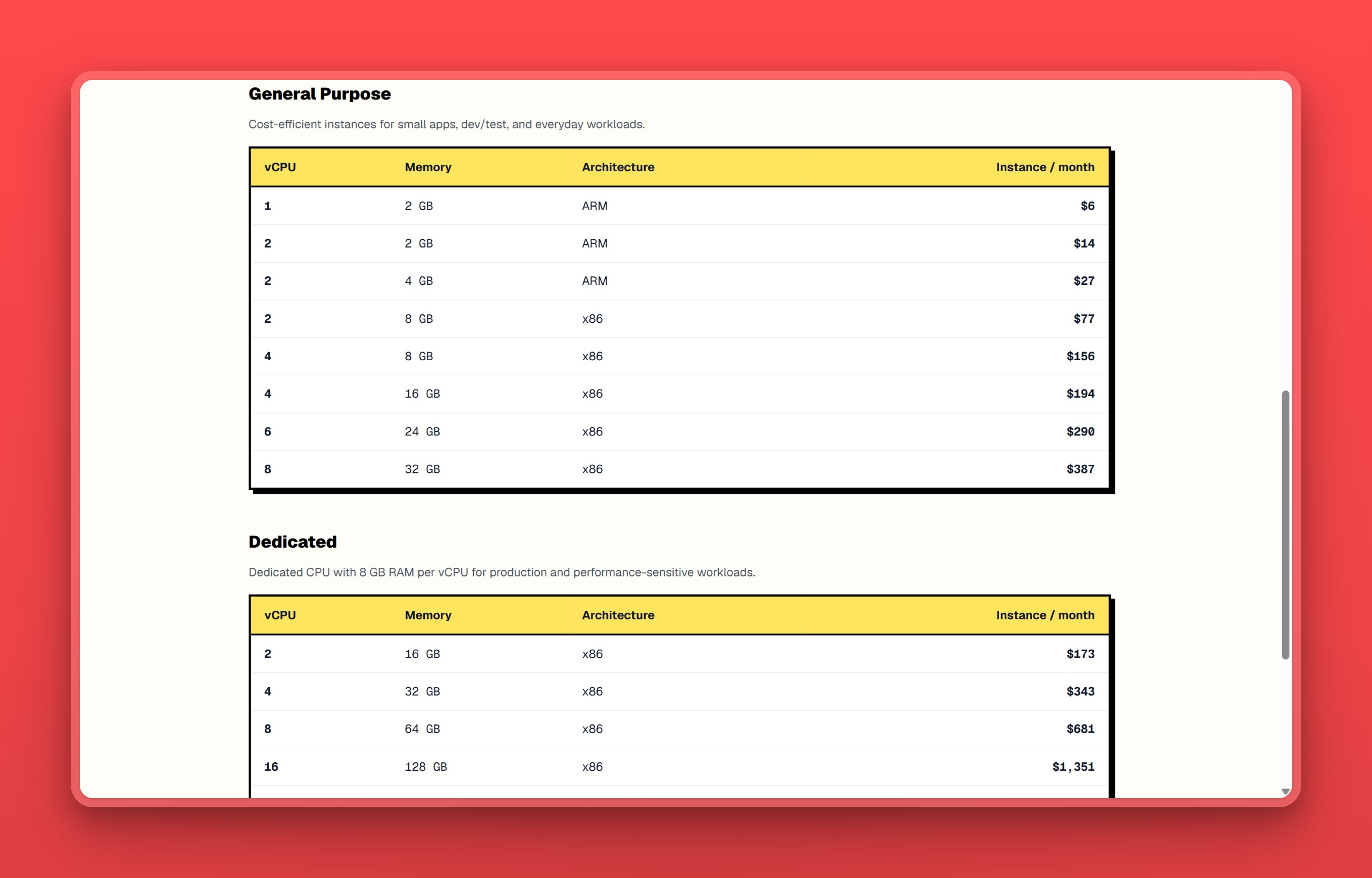
Nearbase runs fully managed PostgreSQL at one fixed price per instance configuration, the same price in every region. The entry configuration is $6 a month for a 1 vCPU / 2 GB instance (General Purpose ARM), plus storage at $3.6 per 10 GB per month with a 20 GB minimum. The 20 GB storage minimum adds $7.20 per month, so the entry configuration costs roughly $13 a month all-in. The full SKU list is on nearbase.dev/pricing.
The structural difference from RDS: there are no IOPS charges and no egress fees. The monthly bill is the instance price plus the storage price. A built-in connection pooler is also available; according to Nearbase, it is off by default and customers opt into it. There is no separate proxy charge to budget for.
The entry Nearbase configuration (1 vCPU / 2 GB, 20 GB storage) has different compute and storage specs from the RDS examples above (db.m6g.large: 2 vCPU / 8 GB; db.m6g.xlarge: 4 vCPU / 16 GB). No HA or connection-pooler equivalence is implied by the price contrast. The billing structure comparison is most relevant at Example 1 scale, where spec differences are smallest.
RDS rates also vary by region: a db.m6g.large costs $0.159/hr in us-east-1 but $0.221/hr in ap-southeast-1 (Singapore), a 39% difference for the same hardware. For teams building for users across Asia and the Middle East, Nearbase runs in ten regions: nine cities (Jakarta, Manila, Kuala Lumpur, Hong Kong, Singapore, Tokyo, Seoul, Dubai, Bangkok) plus Virginia, at the same price everywhere. The Nearbase vs AWS RDS comparison works through the sizing question in more detail, alongside the simpler pricing model explanation.
If your stack depends on AWS-native integration (IAM role-based access, VPC peering, CloudWatch) or you need a region outside the ten-city list, RDS is the right call. At Example 3 scale (~$642/month Multi-AZ), the workload’s requirements map to an AWS-native design. For Example 1 and Example 2 scale, the predictable two-component bill is the deciding factor: instance plus storage, the same price in every region, no IOPS surprises.
How to cut your RDS bill: a 7-point checklist
- Switch storage from io1 to gp3. The gp3 baseline covers most workloads at a fraction of the io1 cost. Storage pricing
- Drop Multi-AZ on non-production databases. One checkbox doubles the bill. Multi-AZ costs
- Trim backup retention. Backup storage beyond the free 100% allocation bills at $0.095 per GB-month; the overage grows with your retention period and data change rate. Backup pricing
- Reserve steady-state instances. A 1-year no-upfront commitment delivers meaningful savings from the first invoice; the exact percentage varies by instance class, region, and payment option. Reserved instances
- Upgrade the PostgreSQL major version. Extended Support on an out-of-date engine can exceed the instance cost. Hidden costs
- Remove RDS Proxy where the application already pools connections and does not need Proxy’s failover reconnection or IAM authentication features. $0.015 per vCPU-hour adds up on larger instances. RDS Proxy
- Clean up orphaned public IPv4 addresses and manual snapshots. Both accumulate silently across old environments. IPv4 and snapshots
Which RDS setup should you choose?
- Dev or hobby project with intermittent traffic - run a db.t4g.micro Single-AZ on gp3 at ~$14/month and skip Multi-AZ entirely.
- Small production database, Single-AZ acceptable - start with a db.m6g.large Single-AZ on gp3 at ~$128/month; add Multi-AZ only when the cost of downtime exceeds the cost of the standby.
- Production database where failover must be automatic - deploy Multi-AZ on an M-series or R-series instance; budget for roughly double the Single-AZ compute and storage cost.
- Stable fleet running the same instance class for 12+ months - buy a 1-year no-upfront Reserved Instance for each steady-state database; savings vary by instance class, region, and payment option (see the RI section above for verified quotes).
- Connection-heavy serverless or microservice workload - evaluate RDS Proxy ($0.015/vCPU-hr) against an application-layer pooler like PgBouncer; if your app already pools connections and does not need Proxy’s failover reconnection or IAM authentication integration, the proxy adds cost without those specific benefits.
- Team wants a predictable two-component bill and serves users in Asia or the Middle East - Nearbase at roughly $13/month all-in at the entry configuration (instance plus 20 GB minimum storage), the same price in every region, no IOPS or egress charges.
- AWS-native stack with IAM, VPC peering, and CloudWatch dependencies - stay on RDS; the integration surface is the value, not just the database.
- Large fleet with cross-region read replicas - RDS with Reserved Instances and a right-sizing pass; at this scale, the switching cost outweighs the remaining price delta.
When AWS RDS is actually the right call
Your stack depends on AWS-native integration
RDS pays for itself when the rest of your infrastructure is built on AWS and needs to stay there. IAM role-based access, VPC peering, CloudWatch dashboards, Secrets Manager rotation, and cross-service security groups all work out of the box. Replicating that integration surface on a non-AWS database means building and maintaining the glue yourself. For a team that already pays for and operates within the AWS ecosystem, the RDS premium is buying integration time, not just database hosting.
You need Multi-AZ automatic failover (typically 60-120 seconds)
Multi-AZ doubles the bill, but it also delivers automatic failover, typically 60-120 seconds, with a recovery time that Single-AZ plus restore from backup cannot match. A production workload where even a few minutes of database downtime has significant impact is the use case the feature was built for.
You already hold Reserved Instances against a stable fleet
A team running three or more production databases at steady-state instance sizes is the profile where Reserved Instances compress the on-demand premium; savings vary by instance class, region, and payment option. At that scale, the effective per-hour rate on RDS approaches what a leaner provider charges at list price, and the switching cost outweighs the remaining delta.
Bottom line on AWS RDS pricing
Add up the applicable billing dimensions before committing to a configuration. The AWS Pricing Calculator accepts instance hours, storage, backup overage, and transfer inputs and produces a monthly total. Run it before selecting your instance class, storage type, and Multi-AZ option: those three choices determine most of the bill.
For a team that needs AWS-native integration, VPC peering, or IAM role-based access, RDS is the right call and Reserved Instances bring the cost to a defensible level. For a team that needs managed PostgreSQL without the billing complexity, Nearbase at roughly $13 a month all-in at the entry configuration (instance plus 20 GB minimum storage) is the most direct alternative: the same price in every region, no IOPS charges, no egress fees, and a 99.99% uptime SLA. Use the AWS Pricing Calculator to total the applicable charges before committing to a configuration.
For managed Postgres without the billing complexity, see how Nearbase pricing compares.
AWS RDS pricing FAQ
Pricing basics
How much does RDS cost?
Add up the applicable billing dimensions using the AWS Pricing Calculator: instance hours at the on-demand rate for your chosen instance class, gp3 storage at $0.115 per GB per month, provisioned IOPS if you need performance above the included gp3 baseline (3,000 IOPS for volumes under 400 GiB, 12,000 IOPS for 400 GiB and above), backup overage beyond 100% of your provisioned storage, and data transfer for your expected egress and cross-AZ patterns.
Apply the Multi-AZ multiplier if you need a standby, and add any extras like RDS Proxy, Extended Support, or Database Insights paid retention. The calculator accepts backup overage and data transfer inputs directly: you supply the estimated volumes and it applies the rates. The two inputs you must estimate yourself are backup overage (which depends on your data change rate and retention policy) and cross-AZ application transfer (which depends on your traffic patterns). Use the worked examples above as a starting estimate for those.
How does AWS RDS charge?
The instance hourly rate is one of seven billing dimensions. The most common causes of a higher-than-expected bill are a storage type of io1 instead of gp3, Multi-AZ doubling both the instance and the storage charge, and backup storage running past the free 100% allocation.
Extended Support fees on an out-of-support engine version and RDS Proxy ($0.015 per vCPU-hour) are less common but can add $50-$300 per month. Open AWS Cost Explorer, filter to RDS, and look at the usage type breakdown to find the charge growing fastest.
Comparisons
Is RDS more expensive than running PostgreSQL on EC2?
Yes, though the exact gap depends on the instance type, configuration, and workload. The RDS premium covers automated patching, automated backups, Multi-AZ failover, and managed monitoring, capabilities that require engineering time and tooling to replicate on a self-hosted EC2 instance.
Whether that premium is worth paying depends on whether your team has the engineering time to manage database operations directly. The per-compute-hour cost of an EC2 instance running the same PostgreSQL version is typically lower; the difference is the managed-operations overhead that RDS covers. If you have a DBA or SRE managing database operations, the EC2 path can reduce the compute line; if you do not, the RDS markup substitutes for that engineering time. The Amazon RDS vs Heroku Postgres comparison covers a related managed-service trade-off.
How does RDS PostgreSQL pricing compare to Aurora PostgreSQL?
Aurora PostgreSQL and RDS PostgreSQL use different pricing structures: compare the specific instance type, storage mode (Aurora Standard bills I/O per read and write separately; Aurora I/O-Optimized has no separate per-read/write I/O charge), and whether you use provisioned or serverless, since those choices determine which service is cheaper for your workload. On Aurora Standard, the per-I/O charge can equal or exceed the compute line for busy OLTP workloads.
Whether RDS or Aurora is cheaper depends on your selected configuration, I/O volume, and whether you choose Aurora Standard (which bills per read and write I/O separately) or Aurora I/O-Optimized (which has no separate per-read/write I/O charge). Aurora Serverless changes the economics again for variable-traffic workloads. The crossover point depends on your specific workload, not traffic level alone. See Aurora Standard and I/O-Optimized rates for the current compute, storage, and I/O charges. The Neon vs RDS comparison and the Supabase vs RDS breakdown cover adjacent pricing comparisons.
Getting started
Does the RDS free tier apply to existing AWS accounts?
The RDS free-tier model changed on July 15, 2025. Accounts created before that date received 750 hours per month of a Single-AZ micro instance plus 20 GB of storage for the first 12 months; all of those legacy windows have now elapsed. Accounts created on or after July 15, 2025 receive $100 in initial credits plus up to $100 in earned credits, and up to six months of free-plan access; credits are valid for up to 12 months subject to plan and upgrade terms.
See the free tier section above for current credit amounts, eligible instance types, and expiry conditions. After any free-tier benefit expires, every instance hour and every GB of storage bills at the on-demand rate.
Can I switch from on-demand to reserved instances without downtime?
Yes. Reserved Instance pricing is a billing construct, not a configuration change to the database. AWS automatically applies the discount to any matching running instance in your account using normalized units. Your instance keeps running without a restart, a new endpoint, or a maintenance window. The only change is the charge category on your invoice.
See what managed Postgres costs with a predictable two-component bill: nearbase.dev/pricing
Figures above reflect on-demand us-east-1 rates at the configurations listed; Nearbase and RDS pricing should be compared directly on their respective pricing pages using the configurations relevant to your workload.
Last updated 2026-09-23